
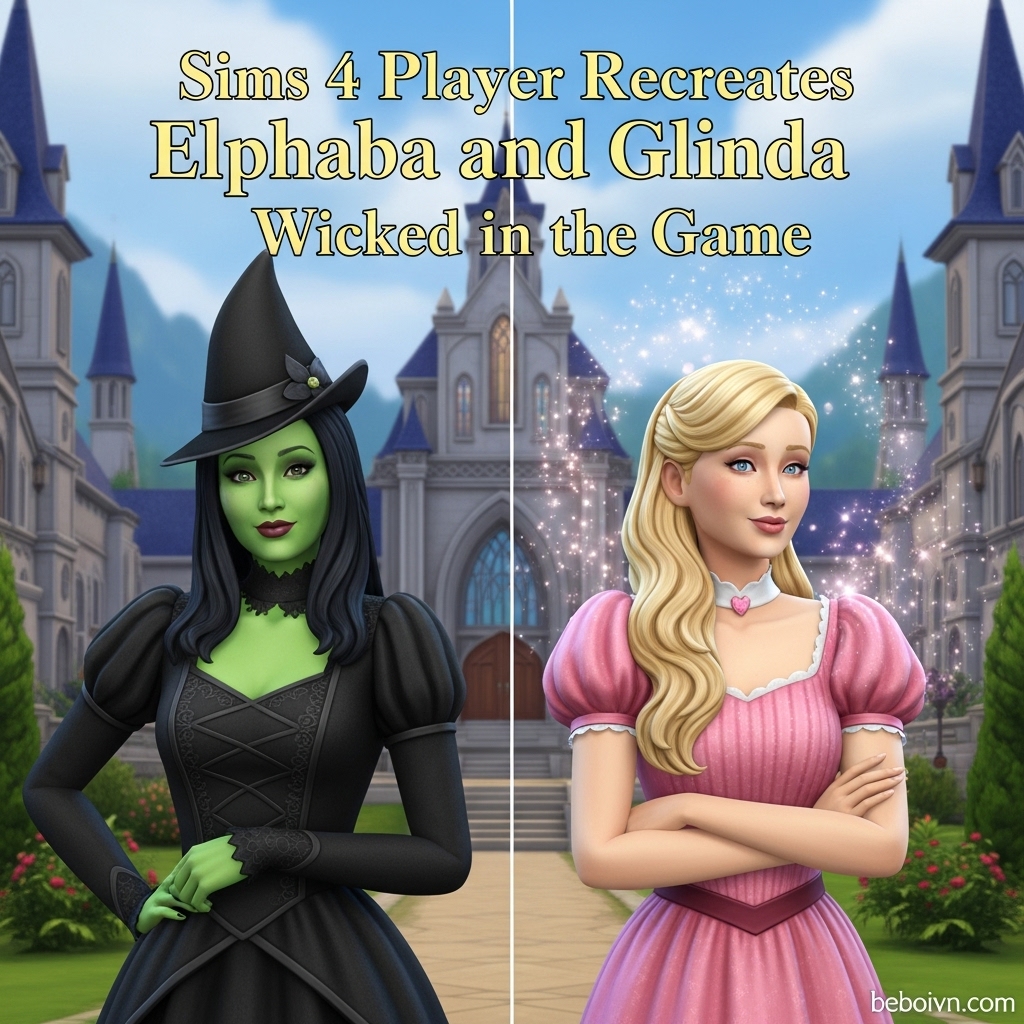
The magical world of Oz has found a new home in The Sims 4, as creative players worldwide are recreating the iconic characters Elphaba and Glinda from the Broadway phenomenon and movie adaptation “Wicked.” This trend has exploded in popularity following the release of the Wicked movies, with talented simmers using the game’s extensive customization options to bring these beloved characters to digital life. Whether you’re a die-hard Wicked fan or a Sims 4 enthusiast looking for your next creative project, recreating these complex characters offers an exciting challenge that combines artistry, technical skill, and a deep appreciation for the source material.
The Growing Trend of Broadway Characters in Sims 4
The Sims 4 has become an unexpected haven for theater fans and Broadway enthusiasts, with players increasingly turning to the game’s Create-a-Sim (CAS) tools to recreate their favorite musical characters. Elphaba and Glinda represent the pinnacle of this trend, challenging creators to capture not just their distinctive appearances but also their personalities and relationship dynamics. What makes these characters particularly compelling for Sims 4 recreation is their visual contrast—Elphaba’s emerald green skin and dark aesthetic versus Glinda’s ethereal pink-and-white glamour—providing creators with a perfect opportunity to showcase their skills with custom content and character design.
Community forums and social media platforms have seen a surge in Wicked-themed Sims content, with players sharing their creations on platforms like Reddit, Tumblr, and the official Sims Gallery. The hashtag #WickedSims has gained traction across social media, creating a vibrant community of fans who exchange tips, custom content recommendations, and inspiration for their Oz-inspired creations.
Essential Tools for Creating Elphaba’s Iconic Green Skin
The most distinctive feature of Elphaba—and often the biggest challenge for creators—is her signature green skin tone. While The Sims 4 base game includes alien skin tones, many players find these options limiting for achieving the perfect Elphaba shade. Fortunately, the modding community has developed several solutions:
Custom Content Options:
- 99 Unnatural Colorful Skintones: This popular mod from ModTheSims offers 20 different colors with five brightness variations each, including a perfect emerald green shade ideal for Elphaba. The mod places these skin tones in the “miscellaneous” category and works seamlessly with most makeup and default skin replacements.
- Unlocked Occult Skin Tones: Available on NexusMods, this modification allows regular Sims to access occult skin tones, expanding your color palette significantly.
- Alien Skin Overlays: For players who prefer to work within the game’s existing systems, creating an alien Sim and then customizing the skin tone can achieve satisfactory results.
Pro Tip: When applying green skin tones, consider using skin overlays and details to add texture and dimension. Many creators recommend combining multiple skin details to achieve a more realistic, less flat appearance that better captures Elphaba’s complexion as portrayed in the movies and Broadway productions.
Crafting Glinda’s Ethereal Beauty and Signature Style
While Elphaba presents the challenge of green skin, Glinda requires a different approach altogether. Her character embodies the “popular” aesthetic—pink, sparkly, and perpetually cheerful. Recreating her in Sims 4 demands attention to detail in makeup, hair, and clothing choices.
Key Elements for Glinda’s Creation:
- Makeup: Focus on soft pink eyeshadows, rosy cheeks, and a natural lip color. Many custom content creators have developed Glinda-inspired makeup sets specifically designed to capture her look from both the Broadway production and the recent movies.
- Hair: Glinda’s blonde hair is typically styled in elegant updos or soft curls. Look for custom content that offers voluminous, romantic hairstyles with plenty of movement.
- Clothing: The iconic “Popular” dress has been recreated by several CC creators, including a tiered pink gown available in multiple colors that perfectly captures the essence of Glinda’s most memorable musical number.
Community Favorite: The “Popular Dress” by Sifix has become a go-to choice for many players creating Glinda, offering 10 color variations and compatibility with teens, young adults, and adults. This dress has been specifically designed to mirror the costume from the Broadway production, making it an authentic choice for dedicated fans.
Building the Perfect Wicked-Inspired World
Creating Elphaba and Glinda is just the beginning. Many players take their Wicked obsession further by building entire worlds inspired by the musical. The Sims 4’s building tools offer incredible flexibility for recreating iconic locations from Oz.
Shiz University: While there’s no official Shiz University content in the game, creative players have found clever workarounds. The Hogwarts Castle custom content by PlumbobKingdom has become a popular substitute, providing the perfect setting for your Elphaba and Glinda Sims to attend “university” together. This elaborate build captures the academic atmosphere and architectural grandeur befitting Oz’s premier educational institution.
Dorm Rooms: For players who want to recreate the iconic dorm room scenes, several creators have designed Wicked-inspired dorm rooms available for download on the Gallery. These builds typically feature contrasting aesthetics—Elphaba’s side with darker, more scholarly decor and Glinda’s area filled with pink, frilly, and glamorous items.
Munchkinland: Complete your Oz experience by downloading or building Munchkinland. Several talented builders have created this iconic location, which you can populate with additional characters like Boq and other Munchkins for a fully immersive experience.
The Technical Process: Step-by-Step Character Creation
For those ready to embark on creating their own Elphaba and Glinda, here’s a comprehensive guide to the technical process:
Step 1: Prepare Your Game
Before starting, ensure you have the necessary custom content installed. This includes:
- Green skin tone mods (like the 99 Unnatural Colorful Skintones)
- Wicked-themed clothing and hair custom content
- Any required expansion packs for specific builds or items
Step 2: Create Elphaba
- Start with a female Sim base in the young adult or adult age group
- Apply the green skin tone from your custom content collection
- Customize facial features to match Elphaba’s distinctive look—strong eyebrows, defined cheekbones, and expressive eyes
- Style her hair in dark, often slightly messy styles that reflect her character’s practical nature
- Choose clothing in dark colors, particularly black, with occasional blue accents (like her library scene outfit)
- Add accessories including her iconic hat, which many CC creators have reproduced
Step 3: Create Glinda
- Start with a female Sim base in the same age group as Elphaba
- Choose a fair skin tone and apply soft, pink-tinged makeup
- Style blonde hair in elegant, often up-swept styles
- Select clothing in pink, white, and pastel colors with plenty of sparkle and glamour
- Add accessories like tiaras, wands, and other magical items
Step 4: Establish Their Relationship
In the game, set Elphaba and Glinda as roommates or best friends to recreate their dynamic from the musical. Consider using the “Roommates” lot trait if they’re living together, or the “Good Friends” relationship status if they’re neighbors.
Community Showcase: Outstanding Wicked Creations
The Sims 4 community has produced some truly exceptional Wicked-themed content that serves as inspiration for aspiring creators:
Reddit User Lobrees: This talented creator gained attention for their comprehensive Elphaba and Glinda recreations, featuring multiple outfit changes for each character. Their work includes Elphaba’s black dress from her first day at Shiz, her sky-blue shirted look from the library scene, and various outfits featuring her iconic hat. For Glinda, they created everything from crowned appearances to outfits inspired by “Dancing Through Life” and “What is This Feeling?”
Gallery Creators: The Sims 4 Gallery features numerous Wicked-themed creations, including:
- Sosa-ccg’s “Wicked Duo”: A base-game compatible version of Elphaba and Glinda that requires no additional packs
- Catpanda2002’s Complete Character Pack: A comprehensive collection featuring multiple Wicked characters, though it requires 26 different packs
- Various Dorm Room Builds: Several creators have designed authentic Wicked-inspired living spaces
YouTube Tutorials: Content creators like Ryeua and Kelsey have produced detailed video tutorials showing their process for creating Elphaba and Glinda, offering valuable insights into techniques for achieving the perfect look.
Advanced Techniques for Authentic Character Recreation
For those looking to take their Wicked creations to the next level, consider these advanced techniques:
Custom Content Creation: If you can’t find the perfect item, consider learning to create your own custom content. Tools like Sims 4 Studio allow players to recolor existing items or create entirely new ones. Many Wicked fans have learned basic CC creation specifically to produce accurate costumes and accessories for their Oz-inspired Sims.
Pose Making: Create authentic scenes by learning to make custom poses. This allows you to recreate iconic moments from the musical, such as Elphaba and Glinda’s duets or their dramatic confrontations. Several pose packs inspired by Wicked are already available in the community.
Storytelling: Use the game’s photography and storytelling tools to create narrative sequences featuring your Wicked Sims. Many players create entire story arcs, from Elphaba and Glinda’s first meeting at Shiz to their eventual parting of ways.
Mod Integration: Consider using mods that enhance gameplay for your Wicked Sims. The Realm of Magic game pack is particularly popular, as it allows Elphaba to cast spells and fly on broomsticks, staying true to her character’s magical abilities.
The Cultural Impact of Wicked in Gaming
The trend of recreating Wicked characters in The Sims 4 speaks to a broader cultural phenomenon—the intersection of theater, gaming, and fan creativity. As video games become increasingly sophisticated platforms for creative expression, players are finding new ways to engage with their favorite media properties.
Why Wicked Resonates with Gamers:
- Visual Distinctiveness: The stark contrast between Elphaba and Glinda provides a clear visual challenge for creators
- Emotional Depth: The complex relationship between the characters offers rich storytelling opportunities
- Musical Connection: Many gamers are also theater fans, creating a natural overlap in interests
- Customization Appeal: The characters’ distinctive appearances push the limits of the game’s customization tools
Broader Trends: This Wicked phenomenon is part of a larger trend of Broadway and musical content in gaming. From Hamilton to Hadestown, theater fans are increasingly turning to games like The Sims 4 as platforms for creative expression and community building around their favorite shows.
Resources and Downloads for Wicked Fans
For those inspired to create their own Wicked-themed content, here’s a curated list of essential resources:
Essential Custom Content:
- 99 Unnatural Colorful Skintones (ModTheSims)
- Popular Dress by Sifix (Various CC sites)
- Wicked Wing Broom by dennerian (For authentic flying scenes)
- Retro ReBOOT Dorothy Dress by Sifix (For complete Oz collections)
Gallery Downloads:
- Wicked Duo by Sosa-ccg (Base game compatible)
- Complete Wicked Character Pack by Catpanda2002 (Requires multiple packs)
- Hogwarts Castle by PlumbobKingdom (As Shiz University substitute)
Community Resources:
- Reddit Communities: r/Wicked, r/thesims, r/sims4cc
- Tumblr Blogs: Musical-themed Simblrs often share Wicked content
- YouTube Channels: Search for “Wicked Sims 4” tutorials and showcases
Conclusion: Bringing Oz to Life, One Sim at a Time
The Sims 4 player community’s passion for recreating Elphaba and Glinda from Wicked demonstrates the incredible creative potential of the game. From the technical challenge of achieving the perfect green skin tone to the artistic satisfaction of capturing these characters’ essences, creators are pushing the boundaries of what’s possible in digital character creation. Whether you’re downloading pre-made creations from the Gallery, following tutorials to create your own versions, or even learning to make custom content specifically for Wicked Sims, there’s never been a better time to explore the magical world of Oz in The Sims 4.
As the Wicked franchise continues to grow with new movies and productions, we can expect this trend to evolve and expand, with even more innovative and authentic recreations emerging from the talented Sims 4 community. The combination of the game’s robust customization tools and the rich visual world of Wicked creates endless possibilities for creative expression, ensuring that Elphaba and Glinda will continue to captivate Simmers for years to come.