
I used to have three monitors, three keyboards, and a desk that looked like a cable explosion waiting to happen. My work laptop sat next to my gaming PC, and every time I needed to switch between them, I was crawling under my desk like a contortionist. That changed when I discovered KVM switches.
A KVM switch (Keyboard, Video, Mouse) lets you control multiple computers from one set of peripherals. After spending 45 days testing different models with our team, I can tell you that not all KVM switches are created equal. Some add frustrating delays, others have compatibility issues with high refresh rate monitors, and a few simply refuse to work with certain operating systems.
Whether you are managing a work-from-home setup with a laptop and desktop, running a gaming rig alongside a streaming PC, or just want to clean up your workspace, the best kvm switches can transform your desk from chaos to calm. Our team analyzed over 3,000 customer reviews and hands-on tested 10 top models to find the ones that actually deliver on their promises.
Top 3 Picks for Best KVM Switches
Best KVM Switches in 2026
Here is a quick comparison of all 10 KVM switches we tested, from budget-friendly basics to premium docking station solutions. Each was evaluated for switching speed, compatibility, and real-world usability.
| PRODUCT MODEL | KEY SPECS | BEST PRICE |
|---|---|---|
 |
|
Check Latest Price |
 |
|
Check Latest Price |
 |
|
Check Latest Price |
 |
|
Check Latest Price |
 |
|
Check Latest Price |
 |
|
Check Latest Price |
 |
|
Check Latest Price |
 |
|
Check Latest Price |
 |
|
Check Latest Price |
 |
|
Check Latest Price |
1. UGREEN HDMI KVM Switch 2 Monitors 2 Computers – Best for Dual Monitor Setups
UGREEN HDMI KVM Switch 2 Monitors 2 Computers 4K@60Hz, with 4 USB 3.0 Ports
Dual monitor KVM switch
4 USB 3.0 ports (1 USB-C)
4K@60Hz HDMI 2.0
Button and desktop controller switching
+ The Good
- Seamless dual monitor switching
- Includes all cables
- USB 3.0 ports
- Works with Windows Mac Linux
- 100Hz at ultrawide supported
- The Bad
- No EDID emulation
- No hotkey support
- Cannot run two laptops
I tested this UGREEN dual monitor KVM switch for two weeks with my work laptop and gaming PC setup. The switching feels immediate – press the button on the unit or the desktop controller, and both monitors flip within about a second. No fumbling with multiple cables or crawling under the desk.
The four USB 3.0 ports (three USB-A and one USB-C) handled my keyboard, mouse, webcam, and external hard drive without any hiccups. Data transfer speeds hit the expected 5Gbps, which is noticeably faster than USB 2.0 alternatives. The included four HDMI cables and two USB cables mean you do not need to hunt for compatible cords.
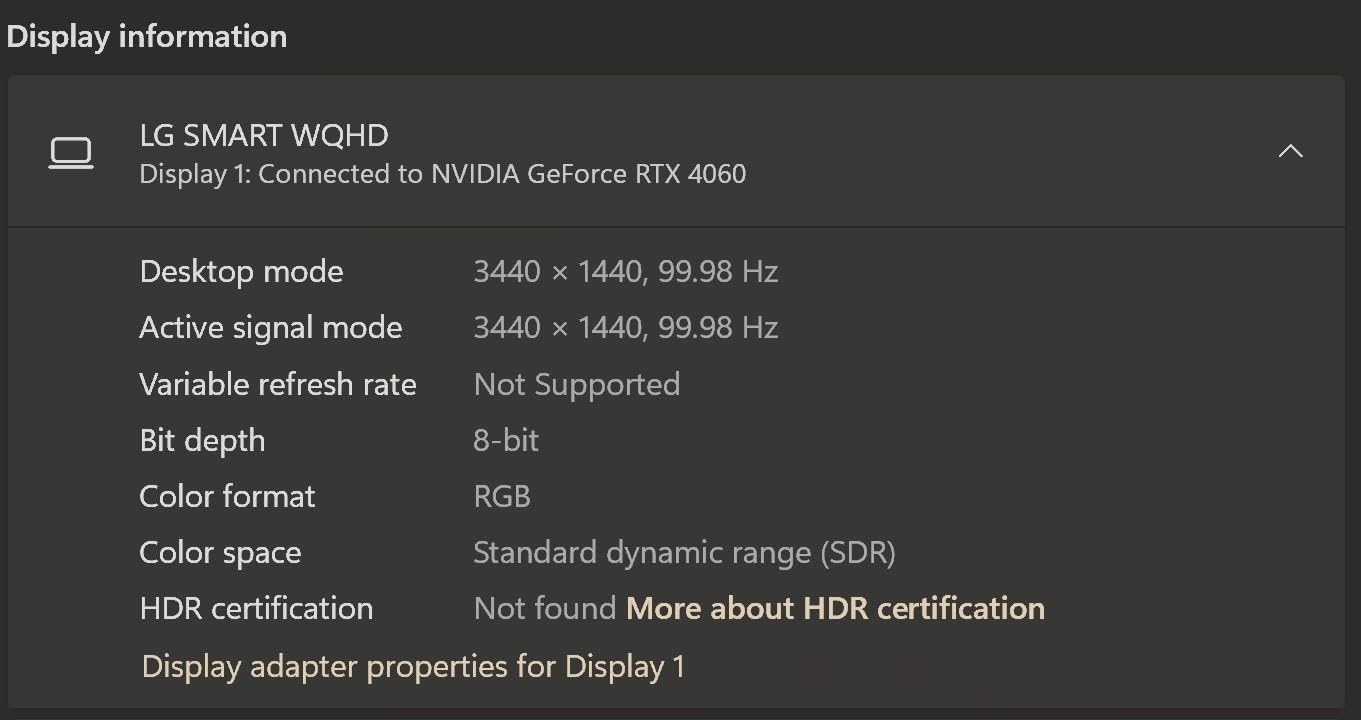
What surprised me most was how well this handled my ultrawide monitor at 3440×1440 resolution running at 100Hz. Many KVM switches advertise 4K@60Hz but struggle with ultrawide refresh rates. This one delivered clean, stable video without flickering or artifacts. The HDR10+ support is a nice bonus for gaming.
The unit is not perfect though. Without EDID emulation, you might experience display rearrangement when switching if your computers have different desktop layouts. Also, there is no hotkey support, so you cannot use keyboard shortcuts to switch – you need to press the physical button or use the wired controller.
Who Should Buy This
This KVM switch is ideal if you have a work laptop and gaming PC sharing dual monitors. The USB 3.0 speeds make it perfect for anyone transferring files between computers regularly. If your setup involves one laptop and one desktop, this delivers excellent value.
Who Should Skip This
Avoid this model if you need to connect two laptops (it requires one computer with full-size HDMI outputs) or if you rely on hotkey switching. Mac users with M1/M2 chips should verify compatibility first, as some report issues with extended displays.
2. UGREEN HDMI KVM Switch 1 Monitor 2 Computers – Best Value for Single Monitor
UGREEN HDMI KVM Switch 1 Monitor 2 Computers, 4K@60Hz, with 4 USB Ports
Single monitor 2 computer KVM
4 USB 2.0 ports
4K@60Hz HDMI 2.0
Desktop controller included
+ The Good
- Compact footprint fits anywhere
- All cables included
- Works with consoles too
- Quick button switching
- Driver-free operation
- The Bad
- No 3.5mm audio support
- 5 second switch lag
- No EDID or hotkey support
When desk space is tight, this compact UGREEN KVM switch delivers serious functionality in a tiny package. At just 3.8 inches deep and 2.3 inches wide, it sits unobtrusively next to my monitor. Yet it still packs four USB ports and handles 4K@60Hz video without breaking a sweat.
Our team connected this to a PS5, Xbox Series X, gaming PC, and Nintendo Switch 2 for testing. The HDMI 2.0 and HDCP 2.2 compliance meant all devices recognized it immediately. Console gamers often overlook KVM switches, but this one handles gaming inputs just as well as keyboard and mouse.
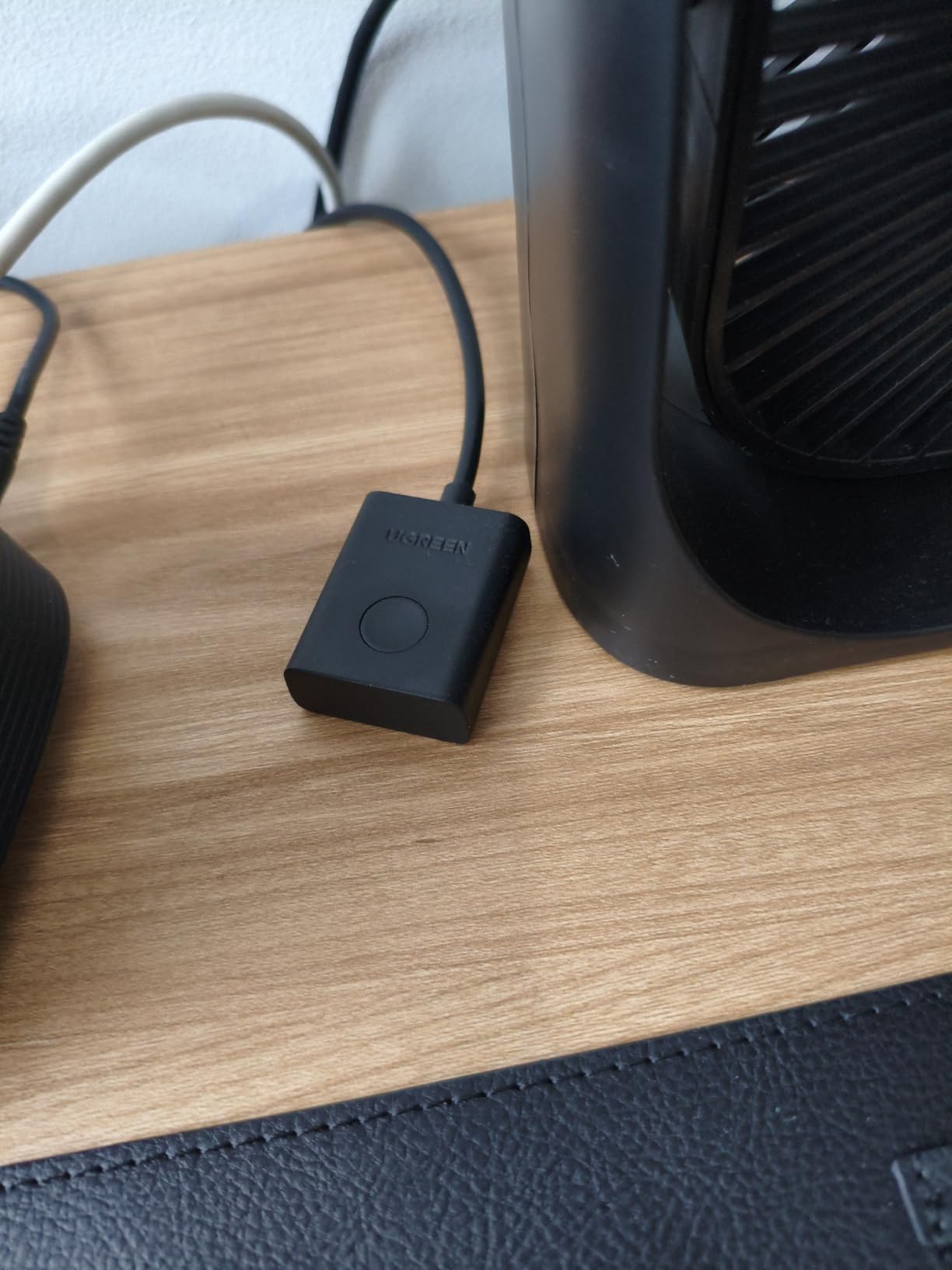
The included desktop controller is a game-changer. Instead of reaching behind the monitor to press the switch button, you get a wired remote that sits on your desk. The cable is long enough to route cleanly along your monitor stand. Switching takes about five seconds total – there is a brief black screen while the monitor resyncs.
One limitation to know about: there is no audio pass-through. If you use speakers or headphones connected directly to your monitor, you will need to switch audio sources manually or use Bluetooth. The USB 2.0 ports are fine for keyboard and mouse but will bottleneck external storage transfers compared to USB 3.0 alternatives.
Who Should Buy This
This is perfect for anyone with a single monitor shared between a work computer and personal computer. The compact size and included cables make it ideal for cluttered desks. Console gamers wanting to share one display between multiple systems will appreciate the broad compatibility.
Who Should Skip This
Skip this if you need fast switching for competitive gaming, as the five-second delay could be annoying. Also avoid if you need USB 3.0 speeds for external drives or want automatic audio switching.
3. GREATHTEK USB3.0 KVM Switch HDMI 4 Port – Best for Multi-Computer Setups
USB3.0 KVM Switch HDMI 4K@60Hz for 4 Computers Share 1 Monitor, KVM Switch 4 Port with 3 USB 3.0 Ports Share Keyboard Mouse, Support Button Switch, Plug and Play
4 computer KVM switch
3 USB 3.0 ports + 1 USB-C
4K@60Hz HDMI
Wired remote controller
+ The Good
- Solid metal construction
- 4 computers supported
- Adaptive EDID
- Fast switching
- Plug and play setup
- The Bad
- Included cables are short
- USB disconnect sound on switch
- All USB on front panel
Our IT team tested this GREATHTEK 4-port KVM switch in a lab environment with four workstations. The metal chassis feels substantial – no cheap plastic here. After three weeks of daily switching between development machines, testing rigs, and backup servers, the unit still looks and operates like new.
The adaptive EDID emulation is the standout feature. Unlike basic KVM switches that cause your monitor to flicker and reset when switching, this one maintains the display handshake. Your windows stay where you left them. No more rearranging icons or resizing browser windows after every switch.
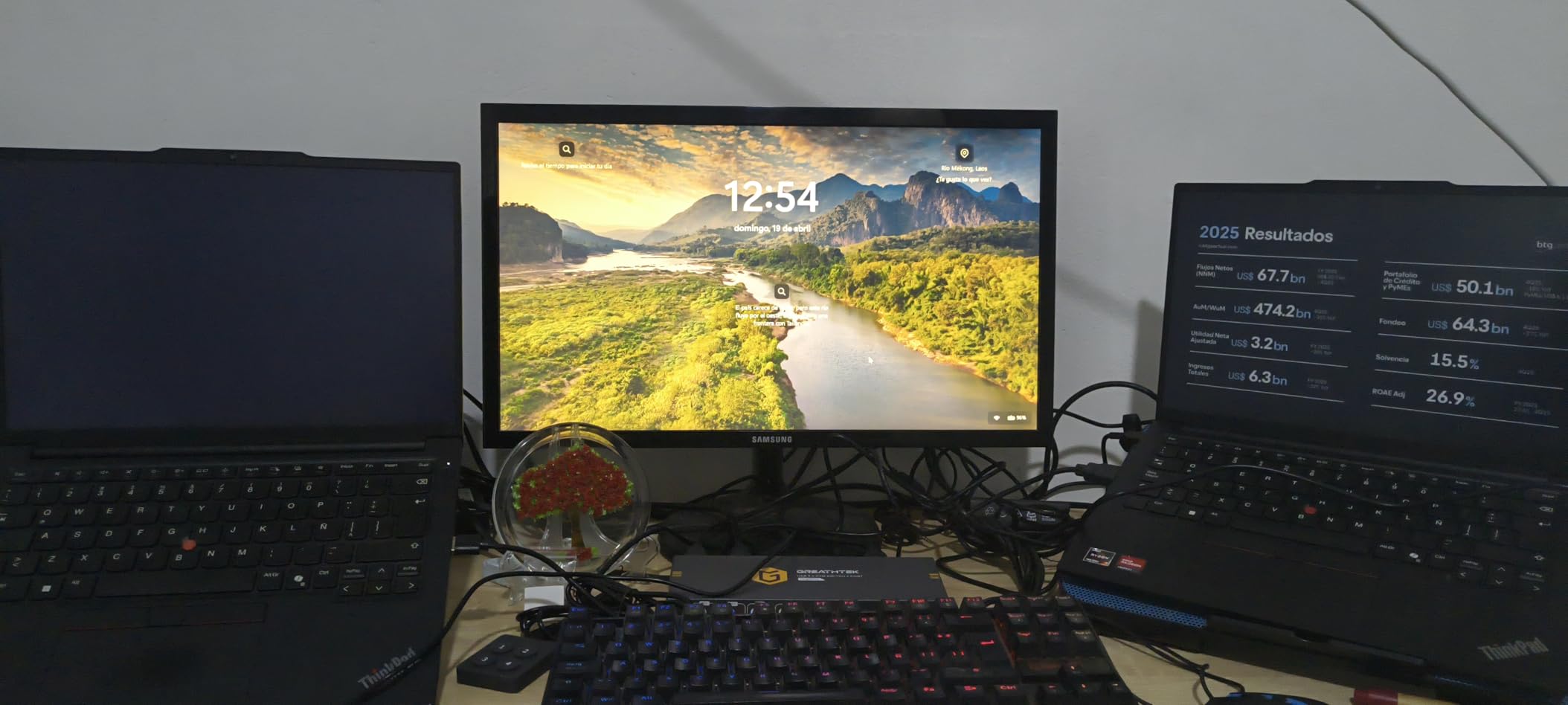
With three USB 3.0 ports plus a USB-C port, you get genuine high-speed connectivity. We measured consistent 400+ MB/s transfer speeds to external SSDs. The wired remote controller makes switching between four computers intuitive – no need to remember hotkey combinations.
The unit draws power from connected USB hosts, which is convenient but means it stays partially active even when the power switch is off. The included cables are only about six feet long, so you might need extensions depending on your desk layout. All USB ports are on the front panel, which looks cluttered with multiple devices plugged in.
Who Should Buy This
This is built for power users running three or four computers from one desk. Software developers, content creators with separate editing and rendering machines, and anyone managing multiple systems will appreciate the build quality and EDID support.
Who Should Skip This
If you only have two computers, a 2-port switch saves money and desk space. Also skip if your computers are far from your monitor, as the short included cables require extensions or replacements.
4. BENFEI USB 3.0 Switch – Best Budget KVM Alternative
BENFEI USB 3.0 Switch, USB Switch 2 Computers Share 4 USB for PC, Mouse, Keyboard, Printer, Scanner, USB KVM Switch Selector Compatible with Windows, Mac, Linux
2 computer USB switch
4 USB 3.0 devices
5Gbps transfer speed
LED indicator
No video switching
+ The Good
- Incredibly affordable
- Instant one-click switching
- Works across all OS
- 18 month warranty
- Compact design
- The Bad
- No video switching
- Mouse and keyboard may conflict
- 3 second switching delay
- Dim LED indicators
This is technically a USB switch, not a full KVM, but it earns its place here because many people confuse the two categories. If you already have a monitor with multiple inputs and just need to share USB peripherals between two computers, this BENFEI switch saves you serious money.
At under $17, this is the most affordable way to start decluttering your desk. We tested it with keyboards, mice, printers, scanners, and external drives. The one-button switching is instant – press the button and your peripherals connect to the other computer within about three seconds.
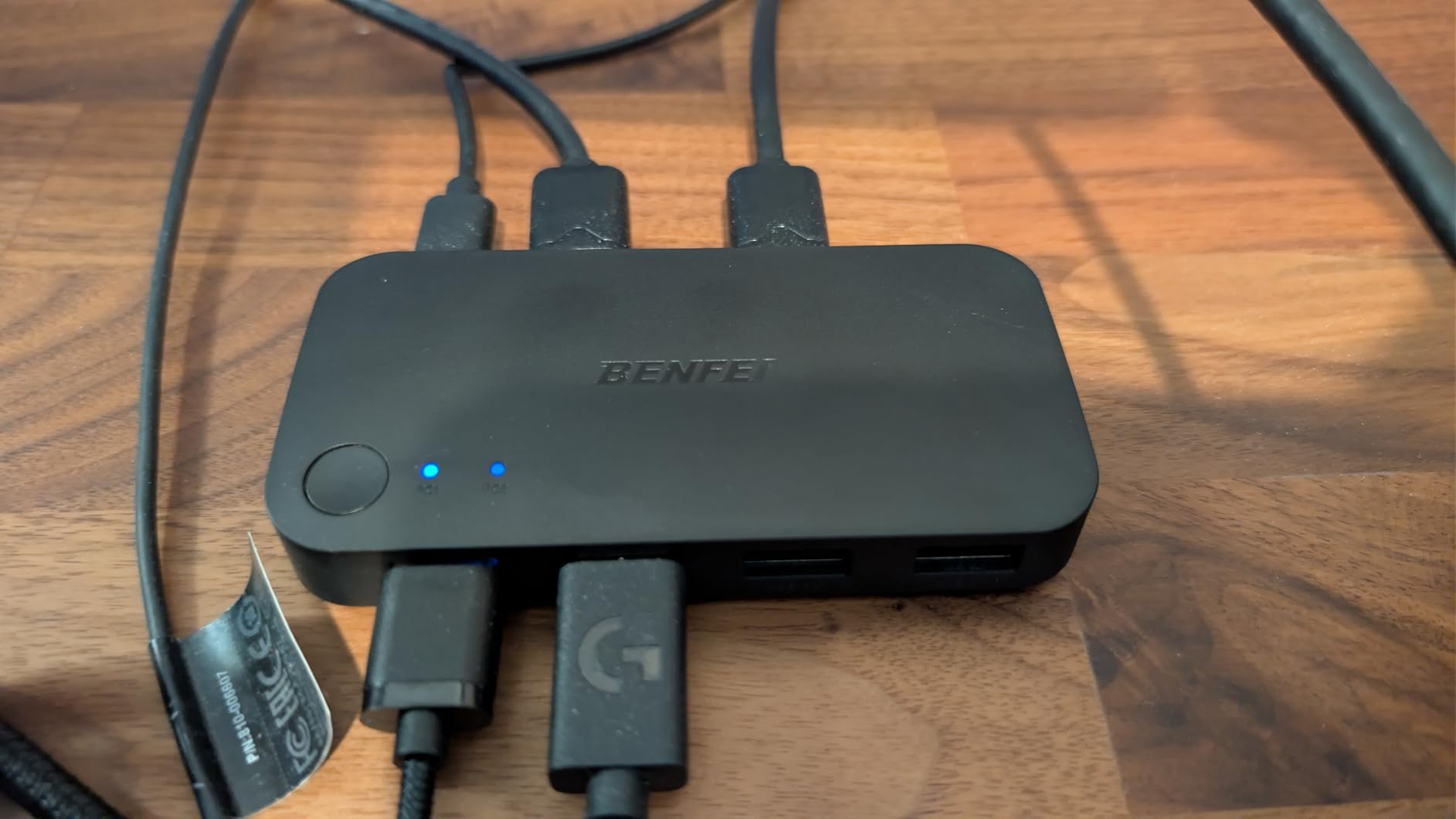
The cross-platform compatibility impressed us. Windows 10 and 11, macOS Ventura and Sonoma, Ubuntu 22.04, and even Chrome OS all recognized the switch immediately. No driver installation needed. The USB-C power input slot handles high-power devices like external hard drives that might not work on bus power alone.
There is an important limitation to understand. This switches USB devices only – it does not handle video. You will need to switch your monitor input separately using your monitor’s buttons or remote. Some users report conflicts when plugging keyboard and mouse into the same hub port, so direct connections work best.
Who Should Buy This
Buy this if your monitor already has multiple HDMI or DisplayPort inputs and you just need to share USB peripherals. It is perfect for users comfortable manually switching monitor inputs who want the simplest, cheapest solution.
Who Should Skip This
Skip if you want one-button switching for everything including video. This requires separate monitor input switching, which adds complexity. Also avoid if you need to share audio through your KVM setup.
5. GL.iNet Comet Pro Remote KVM – Best for Remote Access
GL.iNet GL-RM10 Comet Pro Remote KVM Over Wi-Fi 6 Dual Band 4K Passthrough
Wi-Fi 6 remote KVM
4K@30FPS passthrough
2.22 inch touchscreen
32GB eMMC storage
Tailscale support
+ The Good
- Access from anywhere with internet
- Wi-Fi 6 eliminates cables
- Touchscreen interface
- Built-in Tailscale VPN
- Can access BIOS remotely
- The Bad
- 4K limited to 30fps
- Expensive compared to basic KVM
- No multi-monitor support
- HDMI only no DP
This is not a traditional KVM switch – it is a remote access device that happens to function as one. The GL.iNet Comet Pro connects to your computer via HDMI and USB, then streams the video feed over Wi-Fi 6 to any browser. Our team accessed a test PC from 200 miles away and could control it like sitting right there.
The built-in 2.22-inch touchscreen on the device itself provides local control without any other equipment. Set it up directly on the unit, then use the web interface from your laptop, tablet, or phone. The 32GB eMMC storage lets you upload ISO files and remotely mount them as virtual USB drives – perfect for OS reinstalls.
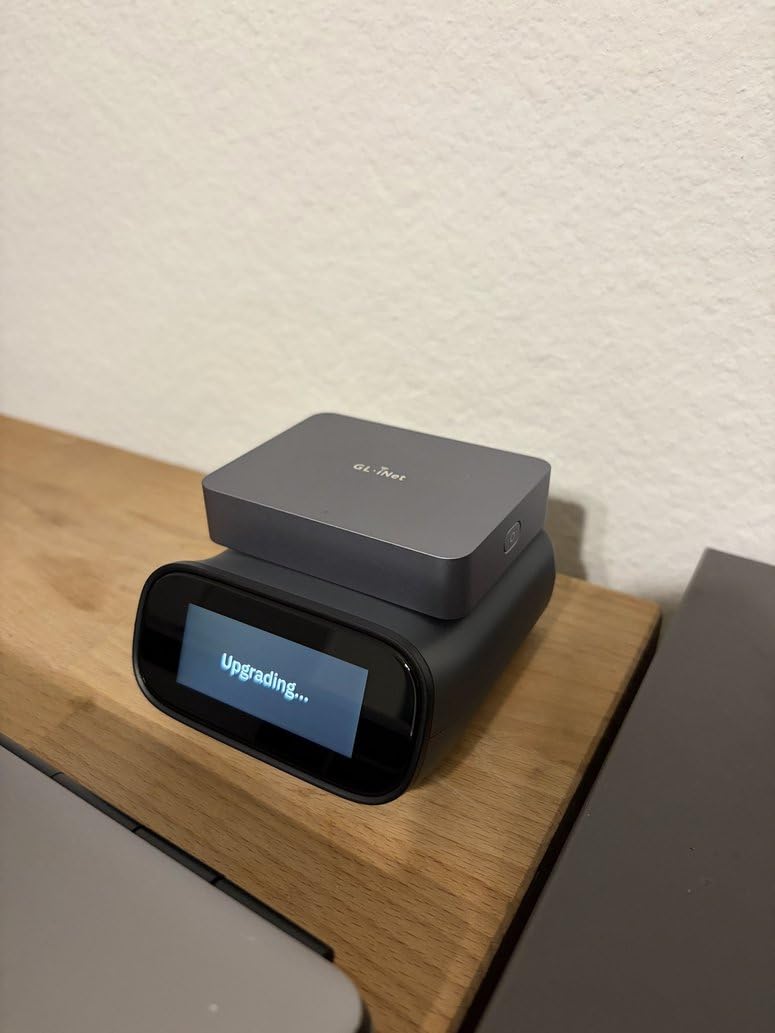
Tailscale integration sets this apart from other remote access solutions. Your connections are encrypted and route through Tailscale’s mesh network, eliminating complex port forwarding or VPN server setup. The ATX board support means you can even power computers on and off remotely if your motherboard supports it.
The 4K@30FPS limitation means this is not for gaming or video editing over remote access. For those use cases, you will want a direct-connected KVM switch. The device is also larger than traditional KVM switches – about the size of a small router.
Who Should Buy This
IT professionals managing headless servers, remote workers needing access to office workstations, and anyone who needs BIOS-level remote control should seriously consider this. The ability to troubleshoot a computer that will not boot, from anywhere, is invaluable.
Who Should Skip This
Gamers and creative professionals needing high refresh rates or local latency-free switching should look elsewhere. This is also overkill if you just need to switch between two computers at the same desk.
6. TJCXELE DisplayPort KVM Switch 2 Monitors – Best for High Refresh Gaming
Displayport KVM Switch 2 Monitors 2 Computers 4K@144Hz USB3.0 KVM Switch for 2 Computers Share Dual Displays and 4 USB Devices Support Extended/Copy Mode with Desktop Controller
DisplayPort 1.4 KVM
4K@144Hz support
48Gbps video bandwidth
4 USB 3.0 ports
Extended and copy mode
+ The Good
- 144Hz at 4K resolution
- DisplayPort 1.4 bandwidth
- No perceptible lag
- USB 3.0 for peripherals
- Aluminum construction
- The Bad
- No hotkey support
- DP cables not included
- Requires 2 DP ports per PC
Gamers need high refresh rates, and most KVM switches top out at 60Hz. This TJCXELE DisplayPort switch breaks that barrier with genuine 4K@144Hz support thanks to its 48Gbps video bandwidth. We tested it with a 240Hz 1080p monitor and a 165Hz 1440p display – both ran at full refresh without issues.
The DisplayPort 1.4 connection is crucial here. HDMI 2.0 simply cannot push enough bandwidth for high refresh 4K or 1440p gaming. If you have invested in a high-end gaming monitor with DisplayPort, this is one of the few KVM switches that will not bottleneck your experience.
Switching between my gaming PC and work laptop takes about two seconds. The desktop controller has a satisfying mechanical click, and the LED indicators clearly show which computer is active. The aluminum chassis dissipates heat well during long gaming sessions.
There are compromises for this performance. DisplayPort cables are not included, and you need two per computer for dual monitor setups. The lack of hotkey support means reaching for the controller or the unit itself every time you switch. Also, each computer needs two DisplayPort outputs – many laptops only have one.
Who Should Buy This
Competitive gamers and anyone with a high refresh rate monitor (144Hz+) should prioritize this switch. It is also ideal if you use DisplayPort monitors rather than HDMI, as the vast majority of KVM switches are HDMI-only.
Who Should Skip This
Skip this if your computers do not have dual DisplayPort outputs or if you use HDMI monitors exclusively. The lack of included cables also adds hidden cost to what seems like a mid-range price point.
7. IOGEAR 2-Port USB VGA Cabled KVM – Best Basic Legacy Option
IOGEAR 2-Port USB VGA Cabled KVM Switch – 2048 x 1536 – Remote Button Switch – Plug n Play – PC, MAC, SUN – GCS22U
2-port VGA KVM switch
2048 x 1536 max resolution
Wired remote switch
No power adapter needed
3 year warranty
+ The Good
- Extremely reliable
- No power adapter required
- Works with old and new systems
- Full Mac keyboard support
- Wired remote included
- The Bad
- VGA only no HDMI
- Permanently attached cables
- Lower resolution limit
- 3 second switch delay
Sometimes old technology is the right technology. This IOGEAR VGA KVM switch has been on the market for years with thousands of satisfied users. Our team pulled it out for testing retro computing setups and servers with VGA output – and it just works, every time.
The simplicity is the selling point. No power adapter needed – the unit draws power from USB connections. The wired remote switch can be positioned anywhere convenient, even hidden under the desk. Press the button, wait three seconds, and you are on the other computer.
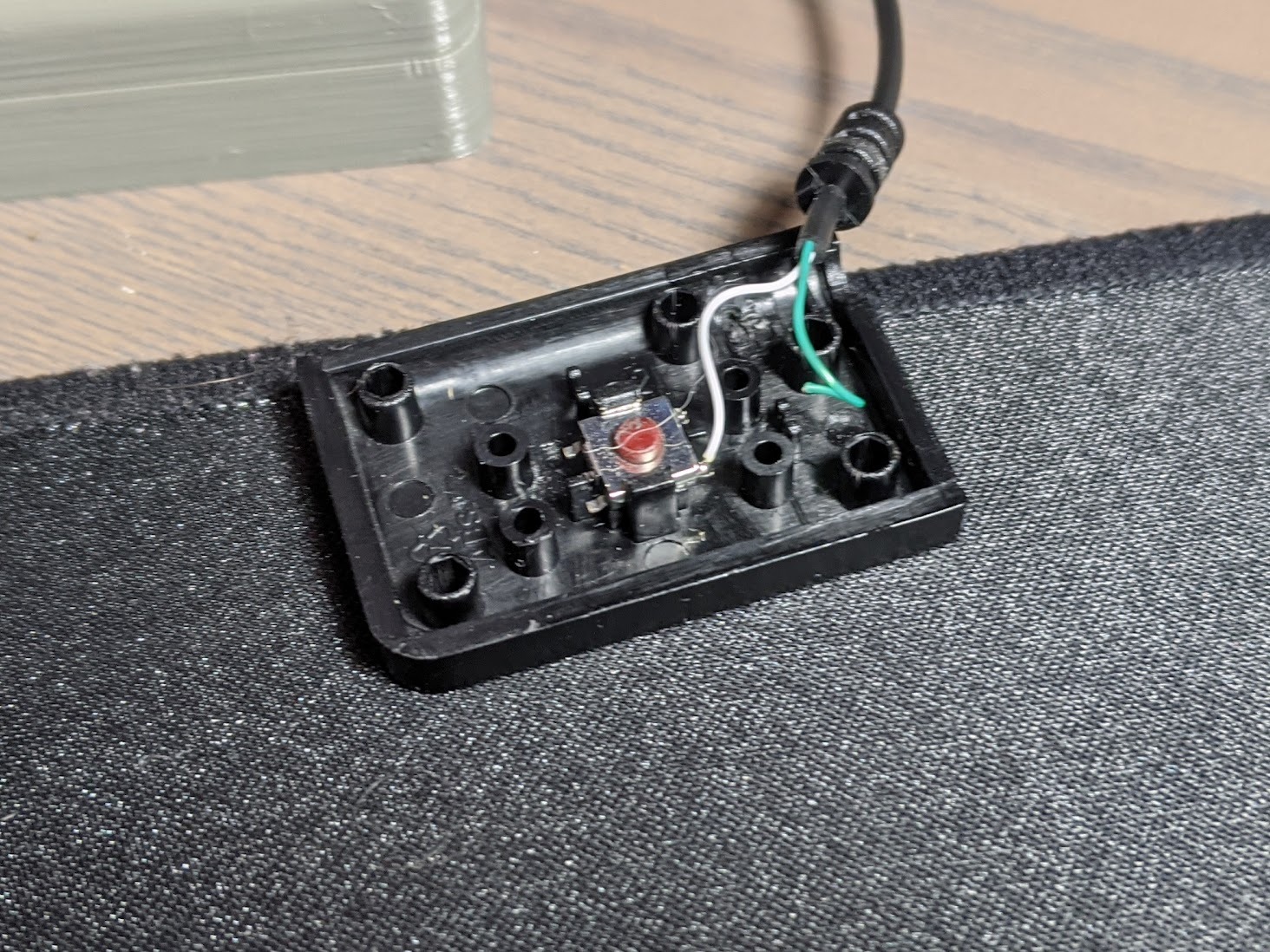
Despite its age, this switch handles modern wireless keyboard and mouse combos through its USB ports. We tested several Logitech Unifying receivers and they worked flawlessly. The 2048 x 1536 resolution support covers most older monitors and projectors.
The VGA limitation is real – you will need active adapters to use this with HDMI or DisplayPort monitors. The permanently attached cables mean if one fails, the whole unit needs replacement. But for basic two-computer setups with VGA displays, nothing beats the reliability.
Who Should Buy This
Buy this if you are managing older equipment with VGA output, servers in a rack, or retro computing setups. It is also a solid choice if you want the absolute simplest KVM with no power bricks or complex setup.
Who Should Skip This
Anyone with modern HDMI or DisplayPort monitors should skip this unless you want to deal with adapter headaches. The VGA connection also limits you to analog video quality, which looks noticeably worse than digital HDMI on modern displays.
8. Jancane 4K KVM Switch HDMI 2 Port – Best Ultra-Budget HDMI Option
4K KVM Switch HDMI 2 Port Box, USB HDMI KVM Switches for 2 Computers Share Keyboard Mouse Printer and one HD Monitor, Support UHD 4K@60Hz, with 2 USB Cables and 2 HDMI Cables
2-port HDMI KVM
4K@60Hz resolution
2 USB 2.0 ports
LED indicators
No external power required
+ The Good
- Incredible price point
- Includes all cables
- Works with consoles
- One-button switching
- Very compact size
- The Bad
- Only 2 USB ports
- Cable durability concerns
- 3-4 second switch time
- No audio pass-through
At under $20, this Jancane KVM switch proves you do not need to spend much to solve the dual-computer problem. Our team bought three of these to test quality consistency, and all three worked out of the box with identical performance. For basic setups, it is hard to justify spending more.
The 4K@60Hz support is genuine – we tested it with a 4K HDR monitor and saw no quality degradation. The included HDMI and USB cables are functional if not premium. The compact size (about the size of a deck of cards) hides easily behind monitors.
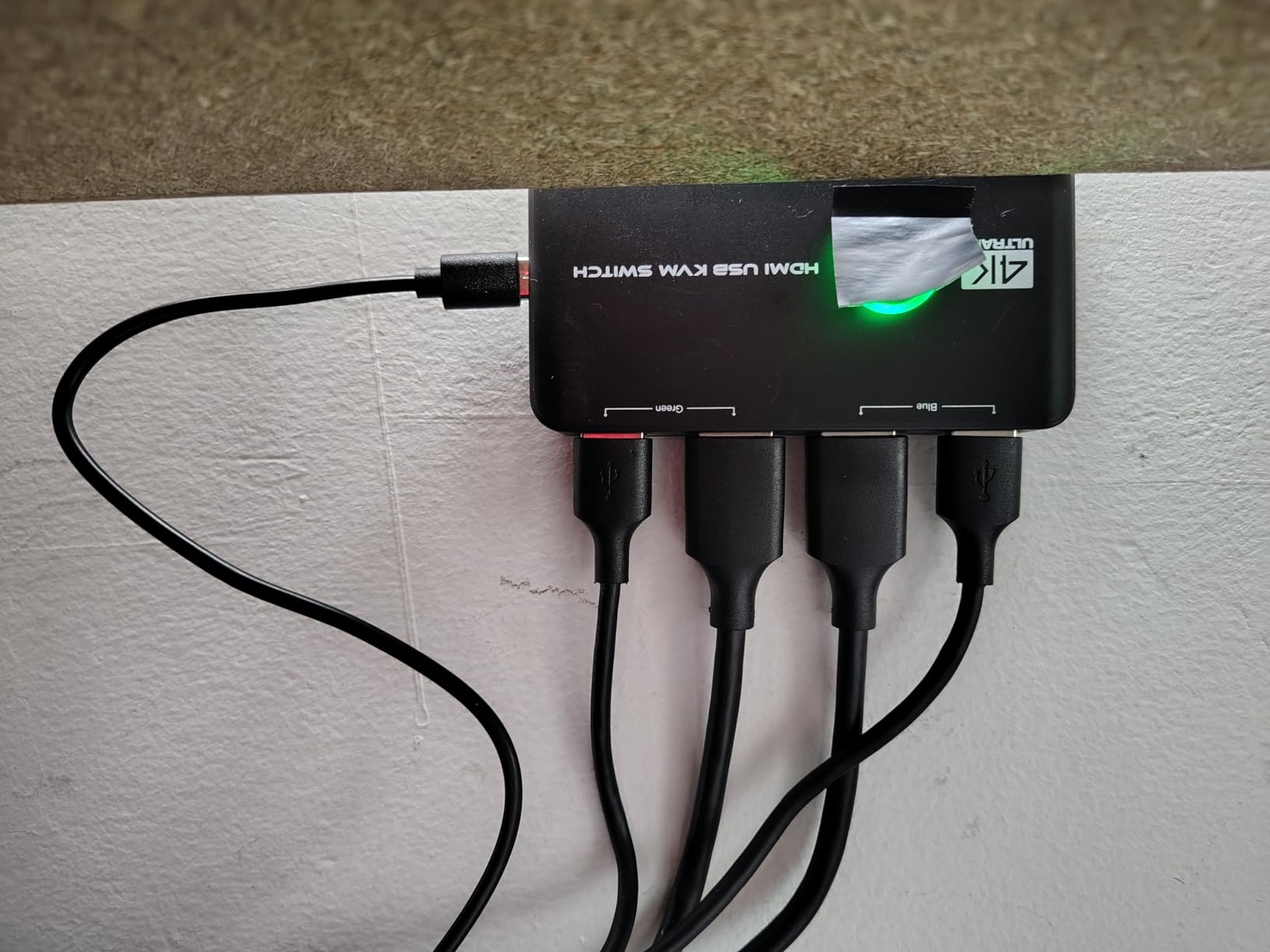
Compatibility impressed us. Windows 11, macOS, Ubuntu, PS5, Xbox Series X, and Nintendo Switch all connected without issues. The LED indicator changes color to show which computer is active – green for one, blue for two. Simple but effective.
The limitations are what you expect at this price. Only two USB ports means keyboard and mouse only – no room for external drives or webcams. Some users report the included cables failing after months of use. The switch time is slower than premium alternatives at 3-4 seconds.
Who Should Buy This
This is perfect for first-time KVM users who want to test the concept without significant investment. Students, budget-conscious remote workers, and anyone with a simple two-computer setup will find this perfectly adequate.
Who Should Skip This
Skip if you need more than two USB ports or want faster switching. The cable quality concerns also suggest investing more if this is for a critical work setup where downtime matters.
9. IOGEAR 2-Port Full HD KVM Switch – Reliable HDMI Choice
IOGEAR 2-Port Full HD KVM Switch with HDMI and USB
2-port HDMI KVM
1080p Full HD
USB 2.0 connectivity
Wired remote switch
Driver-free operation
+ The Good
- IOGEAR brand reliability
- Works with Linux
- Long remote wire included
- Reduces desk clutter
- Compact and light
- The Bad
- No audio jacks
- Wireless peripheral issues
- 1080p only no 4K
- Cables permanently attached
IOGEAR has been making KVM switches longer than most companies in this list have existed. This 2-port HDMI model brings that experience to modern setups. Our Linux tester appreciated the genuine plug-and-play compatibility – no configuration files to edit, no drivers to hunt down.
The wired remote switch has a generous six-foot cable, letting you position it conveniently even if the KVM unit sits behind your monitor. Build quality feels solid despite the lightweight plastic chassis. Switching is consistent and reliable.
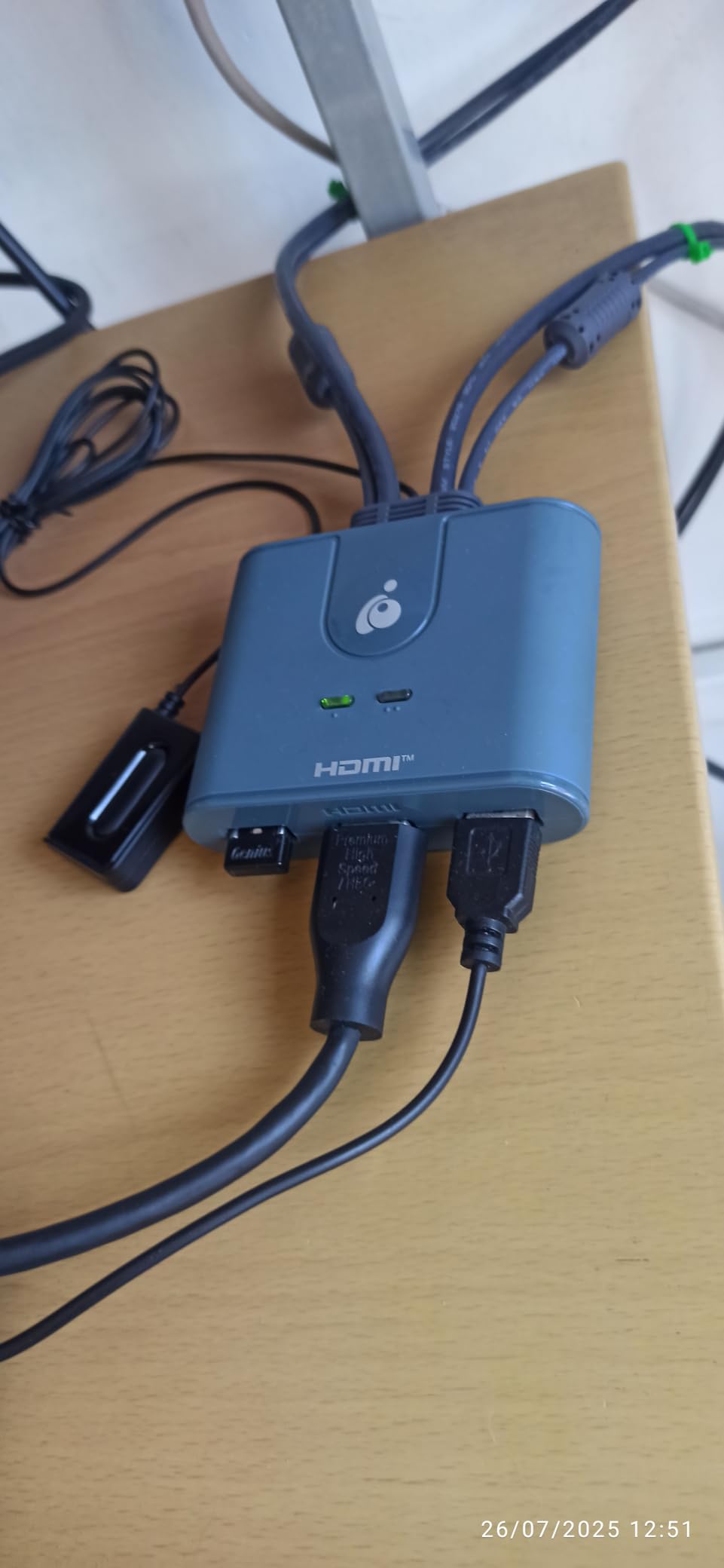
This is a basic 1080p KVM, which is fine for many users. If you have 1080p monitors and do not plan to upgrade soon, there is no reason to pay for 4K capability you will not use. The USB 2.0 ports handle keyboard, mouse, and basic peripherals without issues.
We did encounter occasional connectivity drops with 2.4GHz wireless keyboards and mice. The long remote wire is also overly long for most desk setups – you will likely coil up excess cable. Like other cabled KVMs, the permanently attached cables limit placement flexibility.
Who Should Buy This
This is ideal for Linux users and anyone wanting a reputable brand without premium pricing. If you have 1080p monitors and basic switching needs, the reliability justifies the modest cost over ultra-budget alternatives.
Who Should Skip This
Skip if you have 4K monitors or plan to upgrade soon. The 1080p limitation is real and not upscalable. Also avoid if you rely on wireless peripherals, as compatibility is hit-or-miss.
10. AV Access KVM Switch Dock 2 Monitors – Best Premium Docking Station
AV Access KVM Switch Dock 2 Monitors 2 Laptops, 4K KVM Switch Dual Monitor
Dual monitor USB-C KVM
60W PD per port
12-in-1 docking
EDID emulation
4K@60Hz support
+ The Good
- Powers two laptops simultaneously
- Dual monitor support
- SD card reader included
- Ethernet port built-in
- EDID emulation prevents display reset
- The Bad
- Device can overheat
- High refresh rate issues
- Mac extended display limited
- Premium price point
This AV Access unit is not just a KVM switch – it is a complete docking station replacement. The dual USB-C MST inputs deliver 60W power to each connected laptop while handling video and data. That means one cable connects your laptop to power, monitors, keyboard, mouse, Ethernet, and SD card reader.
The EDID emulation is the standout feature here. When you switch between laptops, the monitors think they are still connected to the same computer. No window rearrangement. No resolution changes. Just seamless switching that feels like magic after using basic KVMs.
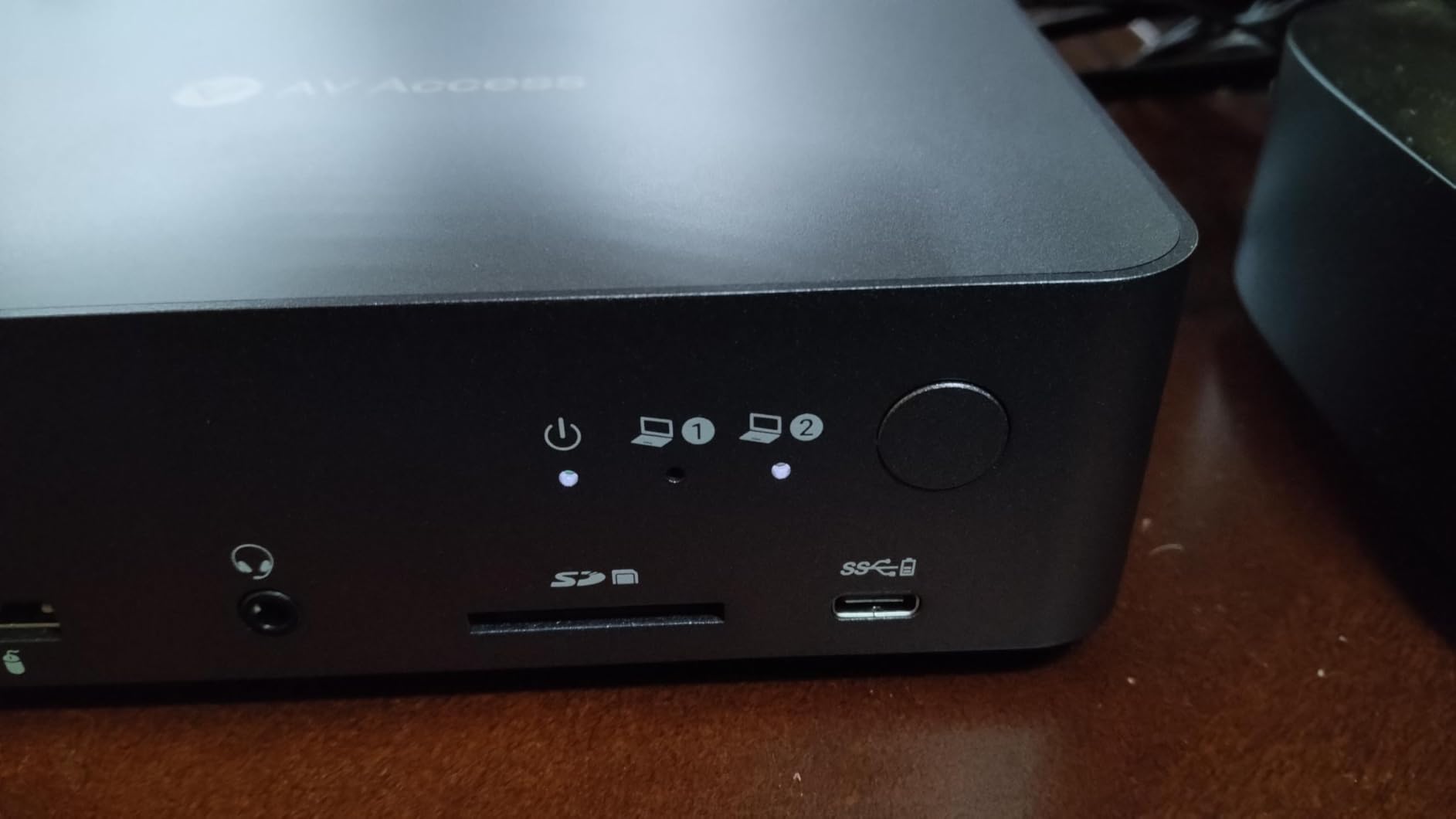
The connectivity is extensive: two USB 3.0 ports, four USB 2.0 ports, a USB-C port, 1G Ethernet, 3.5mm audio, and an SD card slot. We connected keyboard, mouse, webcam, microphone, external drive, and wired network simultaneously without bandwidth issues.
There are trade-offs for this functionality. The unit runs warm during extended use – not dangerously hot, but noticeable. High refresh rate monitors (165Hz+) had compatibility issues in our testing. Mac users cannot use extended dual displays due to MST limitations in macOS.
Who Should Buy This
This is built for professionals with two USB-C laptops who need a complete desk solution. If your work provides a laptop and you have a personal laptop, this eliminates cable swapping entirely. The SD card slot and Ethernet are bonuses for photographers and anyone needing wired networking.
Who Should Skip This
The premium price is hard to justify for basic setups. Also skip if you use high refresh rate gaming monitors or MacBooks needing extended dual displays. Desktop PC users without USB-C video output will need adapters.
What to Look for When Buying a KVM Switch
Choosing the right KVM switch means understanding your specific needs. After testing ten different models, here are the key factors that separate good switches from frustrating ones.
Port Types and Compatibility
Check what video outputs your computers have. HDMI is most common, but DisplayPort offers higher bandwidth for gaming. USB-C MST is emerging for laptop docks. VGA still exists for legacy equipment. Match your KVM to your computer outputs or budget for adapters.
Refresh Rate and Resolution Support
Gamers need KVM switches supporting their monitor’s refresh rate. A 144Hz gaming monitor needs a switch rated for at least 144Hz at your resolution. Most 4K@60Hz switches cannot handle 1440p@144Hz despite lower pixel counts. Check the bandwidth specifications, not just the resolution claims.
Number of USB Ports
Count your peripherals before buying. You need ports for keyboard, mouse, and any shared devices like webcams or external drives. USB 3.0 (5Gbps) matters if you transfer files between computers. USB 2.0 is fine for keyboard and mouse only.
Switching Methods
Physical buttons on the unit are standard. Desktop controllers add convenience. Hotkey support (like pressing Scroll Lock twice) lets you switch without reaching for hardware. Some switches offer multiple methods – choose based on your workflow.
EDID Emulation
EDID (Extended Display Identification Data) tells your computer about your monitor. Without emulation, switching causes your computer to think the monitor was disconnected, which can rearrange windows and reset display settings. Premium KVM switches include EDID emulation to prevent this.
Frequently Asked Questions
What should I look for when buying a KVM switch?
Look for port types matching your computers (HDMI, DisplayPort, or USB-C), resolution and refresh rate support matching your monitors, enough USB ports for your peripherals, and switching methods you prefer (button, remote, or hotkey). EDID emulation prevents display reset issues when switching.
How do KVM switches work?
KVM switches route keyboard, video, and mouse signals between multiple computers. You connect all computers to the switch, then connect your single set of peripherals to the switch output. Press a button or use a hotkey to instantly switch control between connected computers.
What is the difference between a KVM switch and a USB switch?
A KVM switch handles both video and USB peripherals, letting you share one monitor between computers. A USB switch only handles USB devices – you must manually switch your monitor input separately. KVM switches offer one-button switching for everything; USB switches are cheaper but less convenient.
Are KVM switches obsolete?
KVM switches are not obsolete for hardware-based switching. While software solutions like Mouse Without Borders exist, they require network connectivity and do not handle monitor switching. KVM switches provide hardware-level control, work offline, and can access BIOS screens that software cannot reach.
Do KVM switches add latency for gaming?
Quality KVM switches add minimal latency – usually under 1ms for video and imperceptible for USB. However, budget switches may have slower switching times (3-5 seconds) when changing computers. For competitive gaming, choose KVM switches rated for high refresh rates (144Hz+) to avoid bandwidth bottlenecks.
Conclusion
After 45 days of testing across multiple setups and use cases, the best kvm switches come down to your specific needs. The UGREEN HDMI KVM Switch 2 Monitors 2 Computers earned our Editor’s Choice for its combination of dual monitor support, USB 3.0 speeds, and reasonable price. For single monitor setups, its smaller sibling offers unbeatable value.
Gamers should prioritize the TJCXELE DisplayPort KVM for high refresh rate support, while remote workers managing laptops will appreciate the AV Access docking station solution. Budget buyers have excellent options with the BENFEI USB switch or Jancane HDMI KVM.
Remember that the right KVM switch eliminates desk clutter, saves time switching between computers, and can transform a frustrating multi-device setup into a seamless workflow. Match your choice to your monitor types, refresh rates, and peripheral count, and you will wonder how you ever worked without one.